| Author |
 Topic Topic  |
|
Dr. Bob
Moderator

Australia
6593 Posts |
 Posted - 02/25/2008 : 12:07:32 Posted - 02/25/2008 : 12:07:32


|
Hi Guys
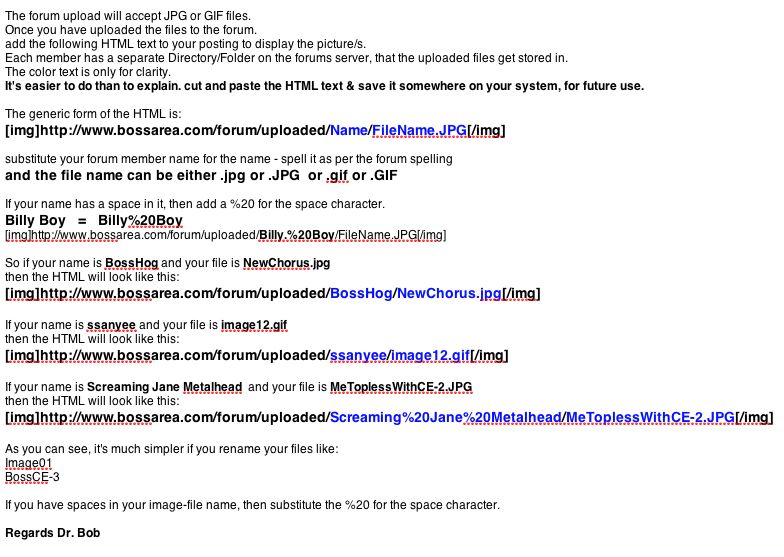
I have posted this JPG of how to display Images, after you upload them on to the forum.
I had to post it as a pic file, because as soon as you type the HTML, the text disappears, as the forum is trying to execute the HTML text.
Hope it helps you out.
Regards Dr. Bob
PS Let me know if there are any minor mistakes, as I typed this up in a hurry.
|
Edited by - Dr. Bob on 02/25/2008 12:11:53 |
|
|
ssanyee
Silver Member

Hungary
288 Posts |
Posted - 02/27/2008 : 15:17:10
|
Hi Dr. Bob,
Cool, thanks for your infos!
Only question: what is the size limit of a file? Is ti still 200kB or can be more?
cheers  |
 |
|
|
Dr. Bob
Moderator
Australia
6593 Posts |
Posted - 02/28/2008 : 06:39:41
|
quote:
Originally posted by ssanyee
Hi Dr. Bob,
Cool, thanks for your infos!
Only question: what is the size limit of a file? Is ti still 200kB or can be more?
cheers
Hi ssanyee
Bossarea will have to answer that one...
The stated size & what we have been uploading lately is very different.
Did you get my replies to your PM's?
Regards Dr. Bob |
|
|
|
ssanyee
Silver Member
Hungary
288 Posts |
Posted - 02/28/2008 : 09:40:55
|
quote:
Originally posted by Dr. Bob
quote:
Originally posted by ssanyee
Hi Dr. Bob,
Cool, thanks for your infos!
Only question: what is the size limit of a file? Is ti still 200kB or can be more?
cheers
Hi ssanyee
Bossarea will have to answer that one...
The stated size & what we have been uploading lately is very different.
Did you get my replies to your PM's?
Regards Dr. Bob
Yes, sure, I have got it, sorry that not answered yet, I'm busy in these days, going to answer soon!
cheers
|
|
|
|
ChristoMephisto
Platinum Member

Canada
1288 Posts |
Posted - 05/27/2008 : 00:10:20
|
| Can't wait for the need to post a pic, always had a problem posting... |
|
|
|
starr36
Platinum Member
Canada
1172 Posts |
Posted - 09/09/2008 : 01:04:59
|
LOL i could not figure this out, so I put pics on my own site.
But I finally tried it again, because I could not cut and paste from
Dr. Bob's instruction above. I got confused because the POP UP MENU
(shown below) is missing the subfolder 'forum'.
No doubt this could be added to the already 'long list'
of small changes to the forum code!!!
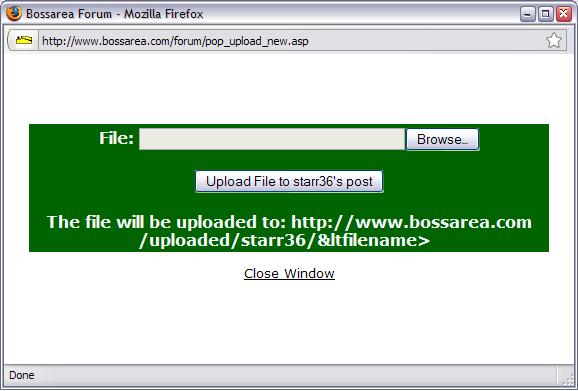
(This is the dialogue box I get when uploading) |
Edited by - starr36 on 09/09/2008 01:14:35 |
|
|
|
Dr. Bob
Moderator
Australia
6593 Posts |
Posted - 09/09/2008 : 08:19:14
|
quote:
Originally posted by starr36
LOL i could not figure this out, so I put pics on my own site.
But I finally tried it again, because I could not cut and paste from
Dr. Bob's instruction above. I got confused because the POP UP MENU
(shown below) is missing the subfolder 'forum'.
No doubt this could be added to the already 'long list'
of small changes to the forum code!!!
(This is the dialogue box I get when uploading)
Hi Starr36
Correct, & of coarse you can't cut & paste from my above instructions.
quote:
Hi Guys
I had to post it as a pic file, because as soon as you type the HTML, the text disappears, as the forum is trying to execute the HTML text.
Hope it helps you out.
Regards Dr. Bob
I was unable to figure out any other way to post the instructions,
& as I mentioned above, the/most forum's will not display the HTML code, if it's uploaded as text, it immediately executes the the HTML Commends, once you press post.
You end up seeing nothing, but the text & that the command-executed.
I did this on my own time, & a long time before I was the moderator.
It was the best that I could do.
And as I wrote in the original post.
I would welcome any help with simplifying these instructions.
You will have to just type the display string out the long way.
I keep an example of the code in one of my work folders, for quick reference & use.
As for the missing sub folder:
quote:
I got confused because the POP UP MENU
(shown below) is missing the subfolder 'forum'.
No doubt this could be added to the already 'long list'
of small changes to the forum code!!!
There is no missing sub folder, the pics upload to the main site, into a folder with your username.
After typing in the display HTML code.
If you just change the username & filename, in my examples, it will display your pics.
Allowing for other file type & Size limitations.
I hope this helps.
Regards Dr. Bob.
|
Edited by - Dr. Bob on 09/09/2008 08:24:55 |
|
|
|
starr36
Platinum Member
Canada
1172 Posts |
Posted - 09/12/2008 : 20:13:55
|
i was just saying the popup menu needs to be fixed. that's all. then we wouldn't need this thread.
I'll drink to that! |
|
|
|
DeFrag
Moderator
USA
3409 Posts |
Posted - 06/24/2009 : 17:37:47

|
[img]uploaded/username/DSC026742.jpg[/img]
Notice the image-tags surrounding the URL to the image you want to display.
When you edit your posts, look for the following "Insert Image" button in the toolbar  , above where you type your messages. , above where you type your messages.
If you click it, the editor will paste in the image-code for you like this: [img][/img]. Then all you have to do is move your cursor between the two tags & type in the URL (address) of the picture you want to display.
Alternatively, you can "select" an already typed in URL to an image & subsequently click on the "Insert Image" button as stated above. This will automatically prepend the [img] & append the [/img] to the image URL. |
Edited by - DeFrag on 06/24/2009 17:38:32 |
|
|
|
DeFrag
Moderator
USA
3409 Posts |
Posted - 06/24/2009 : 17:54:11
|
Additionally,
When helping folks in adding images to their posts, you can show the brackets required for tags in your examples.
The HTML code for a left square bracket is "&" + "#91;".
The HTML code for a right square bracket is "&" + "#93;".
Of course if you use the above codes, they will render immediately upon post submittal. What you need to do is use
TWO AMPERSANDS, followed by the POUND symbol, the NUMERIC value, & finally the SEMICOLON.
This method will properly display the brackets in your post.
If you EDIT your post, you will see brackets have replaced the codes you've entered, so you'll need to add the codes back in. |
Edited by - DeFrag on 06/24/2009 17:56:20 |
|
|
|
FrenchBOSS
Bronze Member

France
68 Posts |
Posted - 06/24/2009 : 18:56:16
|
Oops, didn't see that thread |
|
|
|
JCDenton6
Bronze Member
USA
101 Posts |
Posted - 01/18/2010 : 18:46:25
|
| What if I were to use an image host like image venue.com? would it work here, I use it in other forums. |
|
|
|
bossarea
Forum Admin

United Kingdom
3652 Posts |
Posted - 01/18/2010 : 21:06:41
|
| Yes, no problem with that as long as the image host supports hotlinking (sometimes a host detects that the link is being accessed from a different site and replaces the picture with an advertisement). |
|
|
|
JCDenton6
Bronze Member
USA
101 Posts |
Posted - 01/18/2010 : 21:23:01
|
Image venue does support that, just wanted to be sure.
Cheers |
|
|
|
MervsMods
Bronze Member
USA
133 Posts |
Posted - 01/20/2010 : 05:18:07
|
Thanks for the info Dr. Bob.. Now here's another question. How can I upload an avatar?
My spot looks empty compared to some I've seen.. |
|
|
|
Dr. Bob
Moderator
Australia
6593 Posts |
Posted - 01/20/2010 : 08:42:24
|
quote:
Originally posted by MervsMods
Thanks for the info Dr. Bob.. Now here's another question. How can I upload an avatar?
My spot looks empty compared to some I've seen..
Hi MervsMods
You add avatars from the "Profile" menu.
It's all in that section.
When you are looking at your Profile.
In the Avatar section at the bottom left, click on:
Click here to change your avatar.
Then you will see another screen/dialog.
On the left you will see your current Avatar, under that click on:
Upload a Personal Avatar.
Keep your Avatar to small in file size, around 200-300K or less,
if I remember correctly.
and about 96 x 98 pixels.
The details are on the right of the screen.
From here, you should be able to figure out the rest.
Good luck.
Regards Dr. Bob
|
Edited by - Dr. Bob on 01/20/2010 08:44:59 |
|
|
|
Topic |
|



 How to display Pics-Images on the Forum

